On-Page vs Off-Page SEO: Key Factors That Improve Google Rankings 2026
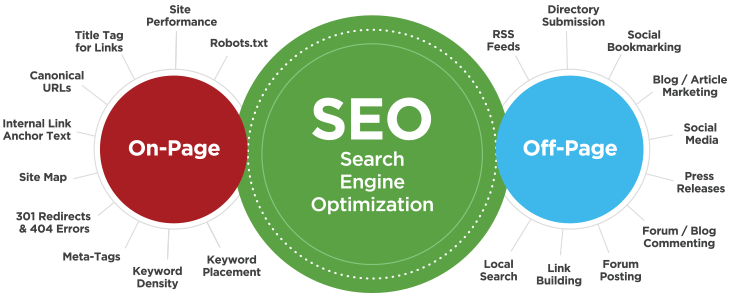
What this SEO Infographic Shows
- SEO sits in the middle because it is the full strategy used to improve visibility in Google.
- It is split into two major areas:
- On-Page SEO: everything you improve on your website
- Off-Page SEO: everything that improves authority outside your website
Main idea of the SEO infographic
- On-Page SEO helps Google understand:
- what your website is about
- how well your pages are structured
- whether users get a good experience
- Off-Page SEO helps Google trust:
- your brand
- your authority
- your relevance in your industry or location
- The infographic is basically showing that strong rankings usually come from:
- good website quality
- good content structure
- good technical setup
- good authority signals from outside the website
On-Page SEO explained
- Site Performance
- Your website should load fast, feel smooth, and work well on mobile.
- Slow sites often lose rankings and conversions.
- Title Tag & Links
- Page titles tell Google what each page is about.
- Internal and external links help search engines understand page relationships.
- Canonical URLs
- Prevent duplicate content confusion.
- Helps Google know which version of a page should rank.
- Internal Link Anchor Text
- The clickable words in internal links help Google understand topic relevance.
- Good anchor text strengthens important pages.
- Site Map
- Helps Google discover and crawl your pages more efficiently.
- 301 Redirects & 404 Errors
- Redirects preserve SEO value when URLs change.
- Broken pages hurt crawl efficiency and user experience.
- Meta Tags
- Includes meta titles and meta descriptions.
- Important for click-through rate and page clarity.
- Keyword Density
- Using keywords naturally helps Google understand page focus.
- Overusing them can hurt readability.
- Keyword Placement
- Keywords work best when placed in:
- title tag
- H1
- headings
- opening paragraph
- image alt text
- URL where relevant
- Keywords work best when placed in:
- Robots.txt
- Tells search engines which parts of the site can or cannot be crawled.
Off-Page SEO explained
- RSS Feeds
- Helps distribute content updates, though it is less important today than before.
- Directory Submission
- Listing your business in quality directories can support visibility and local SEO.
- Social Bookmarking
- Sharing content on platforms that spread visibility and referral traffic.
- Blog / Article Marketing
- Publishing useful content on external sites can build reach and authority.
- Social Media
- Social activity may not directly boost rankings strongly, but it helps exposure, traffic, and brand awareness.
- Press Releases
- Useful when tied to real news, announcements, or PR campaigns.
- Forum / Blog Commenting
- Can help brand visibility, but low-quality spammy use is ineffective.
- Forum Posting
- Can drive targeted traffic and niche authority when done genuinely.
- Link Building
- One of the strongest off-page signals.
- Quality backlinks tell Google that other sites trust your content.
- Local Search
- Especially important for location-based businesses.
- Includes Google Business Profile, citations, and local relevance.
Percentage breakdown for ranking importance
There is no official Google percentage breakdown. Google does not publish exact ranking weights.
So the percentages below are a practical SEO-agency estimate, not a Google rulebook.
Big-picture estimate
- On-Page SEO: 60%
- Off-Page SEO: 40%
This is a solid general model for most business websites.
Why:
- Without good on-page SEO, Google struggles to understand and trust the page quality.
- Without off-page SEO, it becomes harder to compete in tougher markets.
Suggested On-Page SEO importance breakdown
These percentages are within the On-Page SEO category:
- Site Performance — 18%
- Title Tag & Links — 14%
- Keyword Placement — 12%
- Internal Link Anchor Text — 11%
- Meta Tags — 10%
- Canonical URLs — 8%
- 301 Redirects & 404 Errors — 8%
- Site Map — 7%
- Robots.txt — 6%
- Keyword Density — 6%
How to read that
The most important on-page items are usually:
- page speed and user experience
- title tags and page targeting
- keyword placement
- internal linking
- technical cleanliness
Suggested Off-Page SEO importance breakdown
These percentages are within the Off-Page SEO category:
- Link Building — 35%
- Local Search — 18%
- Blog / Article Marketing — 12%
- Directory Submission — 9%
- Social Media — 8%
- Press Releases — 6%
- Forum Posting — 4%
- Forum / Blog Commenting — 3%
- Social Bookmarking — 3%
- RSS Feeds — 2%
How to read that
The strongest off-page drivers are usually:
- quality backlinks
- local authority signals
- brand mentions and external content visibility
The weakest are usually:
- RSS
- bookmarking
- low-quality forum/comment tactics
Practical ranking priority order
If you want the most useful real-world version of this infographic, prioritize SEO like this:
- Content quality and page relevance
- Site performance and mobile usability
- Title tags, headings, and keyword placement
- Internal linking
- Technical SEO health
- High-quality backlinks
- Local SEO signals
- Brand visibility and trust signals
Best simplified version for clients
- On-page SEO makes your website clear, fast, and easy for Google to understand.
- Off-page SEO builds trust and authority around your website.
- Google rankings improve fastest when both are working together.
Here is a clean, WordPress SEO action plan based on the infographic.
Before you start: the simplest WordPress SEO setup
Use one full SEO plugin, not several overlapping ones. The common all-in-one options are Yoast SEO, SEOPress, AIOSEO, Rank Math, and The SEO Framework; they cover core items like titles/meta, sitemaps, canonicals, and more. WordPress also includes Site Health under Tools → Site Health, and WordPress core supports native image lazy-loading.
A practical stack for most business sites is:
- SEO plugin: Yoast, SEOPress, RankMath, AIOSEO, or The SEO Framework
- performance/caching plugin: often your host’s own plugin is best. LiteSpeed Cache is a all in one prefomance, caching and image optimization plugin
- Image optimization plugin if needed
- Google Search Console connected for indexing and monitoring Google’s guidance is to make pages understandable, crawlable, and useful; WordPress tools mainly help you implement that cleanly.
On-Page SEO: how to do each item in WordPress
1) Site Performance
What to do
- In WordPress, go to Tools → Site Health and fix every critical issue first.
- Use your host’s page cache or a caching/performance plugin.
- Compress large images, serve modern formats where possible, and keep lazy-loading enabled.
- Remove unused plugins/themes and keep PHP, WordPress, theme, and plugins updated.
WordPress Site Health is built to surface important configuration and performance issues, and image/lazy-load tools reduce page weight and improve speed.
Manual way
- Resize images before upload.
- Use lightweight themes/templates.
- Avoid autoplay video in the hero section.
- Limit third-party scripts like chat widgets and heavy sliders.
Plugin way
- If your host provides one, use its performance plugin first.
- For images, use one optimizer such as Smush, EWWW, or Optimole. These tools advertise compression, lazy loading, and modern image delivery.
Best practice
- Focus first on homepage, service pages, and top blog posts.
2) Title Tags & Links
What to do
- Set a unique SEO title for every important page.
- Keep titles concise and descriptive.
- Make internal links crawlable and use natural anchor text that explains the destination.
Google recommends descriptive <title> elements and clear, crawlable links with meaningful anchor text.
In WordPress
- Edit a page/post.
- In your SEO plugin box, write the SEO title and meta description.
- Add internal links inside the content to related pages like Services, Pricing, FAQs, Contact, and relevant blog articles.
Manual way
- If not using a plugin, your theme would need to output proper titles, but using an SEO plugin is easier and safer.
Plugin way
- Use your SEO plugin’s title templates for posts, pages, categories, and products.
- Then override important pages manually.
Best practice
- Homepage: brand + main keyword
- Service pages: service + city/location
- Blog posts: topic + search intent
3) Canonical URLs
- Make sure duplicate or very similar pages point to one preferred version.
- Use canonicals for filtered URLs, duplicate category variations, or parameter-based pages. Google documents canonicalization as the way to indicate the representative URL from duplicate or near-duplicate pages.
- Most SEO plugins add self-referencing canonicals automatically.
- If you have duplicate pages or unusual URL structures, set the canonical URL manually in the SEO plugin advanced settings.
- Add a <link rel=”canonical”> tag in the page head, but plugin control is easier.
- Do not let both HTTP/HTTPS, www/non-www, or multiple slug versions compete.
- Use 301 redirects alongside canonicals when an old URL should fully retire. Google says redirects are a strong canonicalization signal.
4) Internal Link Anchor Text
- Build topic clusters.
- Link from broad pages to specific pages and back again.
- Use anchor text that tells users and Google what the next page is about. Google explicitly says anchor text helps people and Google make sense of linked pages.
- In each service page, add links to:
- related services
- case studies
- FAQs
- contact page
- In blog posts, link to service pages using natural phrases.
- Create a simple internal linking sheet:
- page URL
- primary keyword
- 3 pages it should link to
- 3 pages that should link to it
- Some SEO plugins offer internal-link suggestions, but manual editorial linking is usually better for money pages.
- Avoid generic anchors like “click here.”
- Use phrases like “WordPress SEO services,” “local SEO Pretoria,” or “technical SEO audit.”
5) Site Map
- Enable XML sitemaps in your SEO plugin or WordPress setup.
- Submit the sitemap in Google Search Console. A sitemap helps search engines crawl a site more efficiently and tells them which pages and files matter. Google also notes you can submit sitemap URLs through Search Console or list them in robots.txt.
- Turn on XML sitemaps in the SEO plugin.
- Exclude thin or noindex content types if necessary.
- Submit /sitemap.xml or the plugin’s sitemap URL in Search Console.
- Include:
- homepage
- service pages
- valuable blog posts
- product pages
- Exclude:
- thank-you pages
- internal search results
- thin archive pages you do not want indexed
6) 301 Redirects & 404 Errors
What to do
- Redirect old URLs to the closest relevant new page.
- Monitor 404s and fix broken internal links quickly.
Google says redirects are used as a signal that the target should be canonical, and 301 redirects are generally the right choice for permanent moves.
In WordPress
- If your SEO plugin includes redirects, use that.
- Otherwise use a dedicated redirect manager.
- After changing slugs, set a redirect immediately.
Manual process
- Keep a redirect log:
- old URL
- new URL
- date added
- reason
Best practice
- Never redirect every deleted page to the homepage.
- Redirect to the closest matching page.
- Fix internal links so they point directly to the final URL.
7) Meta Tags
- Write a unique meta title and meta description for every key page.
- Set robots directives only when needed, such as noindex for thin utility pages. Google’s title-link documentation stresses clear page titles, and Google’s robots guidance explains that robots.txt is not for keeping pages out of Google; use noindex or protection where needed.
- Use the SEO plugin fields on each page/post.
- For archive pages, set global templates in the plugin settings.
- Use noindex on pages like:
- thank-you pages
- author archives on single-author sites
- low-value tag archives
- Title: include main keyword naturally
- Description: sell the click, not just the keyword
8) Keyword Density
- Do not chase a fixed percentage.
- Use the primary keyword naturally in the title, H1, intro, headings, alt text where relevant, and body copy.
- Add related phrases and supporting subtopics. Google’s SEO Starter Guide emphasizes helping search engines understand content and helping users decide to visit; it does not recommend formulaic keyword stuffing.
- Create one page per main intent.
- Use one primary keyword and several natural variations.
- Read the page aloud; if it sounds forced, reduce repetition.
- Think “topical coverage,” not “keyword count.”
9) Keyword Placement
- SEO title
- H1
- first paragraph
- one or two H2s where natural
- image alt text when truly relevant
- slug/URL if sensible
- Edit the page title and permalink before publishing.
- Structure with heading blocks.
- Add image alt text in the Media Library or image block settings.
- Add local SEO keywords (area specific)
- One page = one main search intent.
- Don’t make multiple pages target the exact same primary keyword.
10) Robots.txt
What to do
- Use robots.txt to guide crawler access, not to hide sensitive pages from Google.
- Add your sitemap URL to it.
Google states that robots.txt controls crawler access and is not a reliable way to keep a page out of Google; for that, use noindex or protection.
In WordPress
- Many SEO plugins let you edit robots.txt.
- At minimum, include the sitemap line if needed.
- Do not block CSS/JS or important page paths by accident.
Simple example
User-agent: *
Disallow: /wp-admin/
Allow: /wp-admin/admin-ajax.php
Sitemap: https://yourdomain.com/sitemap.xml
Best practice
- Keep it simple.
- Review after migrations or staging deployments.
Off-Page SEO: how to do each item with WordPress supporting it
1) RSS Feeds
What to do
- WordPress generates RSS feeds by default.
- Make sure blog/news posts are published consistently so feed consumers and syndication tools can pick them up. WordPress natively supports feeds, while Google treats feeds as discovery/distribution aids rather than major ranking levers.
In WordPress
- Keep your blog active.
- Publish category-specific content consistently.
- Link your feed where relevant if you syndicate content.
Best practice
- Treat RSS as a distribution assist, not a main ranking tactic.
2) Directory Submission
- Submit your business to quality, relevant directories only.
- Keep NAP consistent: name, address, phone. For local SEO, Google highlights local business information and structured data as ways to communicate business details.
- Make your Contact page the source of truth for:
- business name
- phone
- address
- opening hours
- Add LocalBusiness schema through your SEO plugin if available. Google documents Local Business structured data for business details shown in Search/Maps contexts.
- Use the exact same business details everywhere.
3) Social Bookmarking
- Share new content to reputable industry communities where it genuinely fits.
- Do not spam bookmarking sites.
- Add clean share buttons if useful.
- Publish content worth saving:
- checklists
- original data
- guides
- templates
- The WordPress part is content packaging; the result comes from usefulness, not mass submission.
4) Blog / Article Marketing
What to do
- Use WordPress to publish strong “linkable assets”:
- how-to guides
- case studies
- original research
- comparisons
- local market insights
- Then pitch those assets to other sites for features, guest contributions, or mentions.
Google’s SEO guidance centers on useful, search-friendly content; off-site promotion works best when the content is worth citing.
In WordPress
- Create an Insights, Blog, or Resources section.
- Use categories and internal links to build topical authority.
- Add author bios and company credibility signals.
Best practice
- Don’t publish thin AI filler.
- Publish fewer, stronger articles tied to your services.
5) Social Media
- Use social platforms to amplify content and branded searches.
- The direct SEO effect is limited, but social can drive discovery, links, and brand recognition.
- Add Open Graph/social metadata via your SEO plugin.
- Add clear share images and post excerpts.
- Publish pages that look good when shared.
- Share:
- blog posts
- case studies
- testimonials
- project launches
- industry commentary
6) Press Releases
- Use them only for real news:
- launch
- award
- partnership
- research
- expansion
- Publish the newsroom version on your WordPress site first, then distribute outward.
- Create a News or Press category.
- Each release should have:
- strong headline
- summary
- quote
- company info
- contact details
- branded imagery
- Press releases are best for brand/PR visibility, not as a shortcut to rankings.
7) Forum / Blog Commenting
- Use it for visibility and relationships, not spam links.
- Leave thoughtful comments where your audience actually reads.
- Publish helpful resources worth referencing when relevant.
- When you comment elsewhere, link only if it genuinely helps the conversation.
- No mass-comment tactics.
- Brand visibility matters more than the link itself.
8) Forum Posting
- Participate in niche communities where your prospects ask questions.
- Link to a relevant WordPress resource page only when it truly answers the question.
- Build destination pages for these mentions:
- ultimate guide
- case study
- FAQ page
- comparison page
- service explainer
- Forums work best when your WordPress content is genuinely useful.
9) Link Building
What to do
Build links by creating pages on WordPress that are easy to cite:
- original statistics
- industry studies
- local guides
- tools/calculators
- comparison pages
- high-quality case studies
Google uses links as signals for discovery and relevance, and link best practices emphasize crawlable, understandable linking.
In WordPress
- Create a Resources or Studies content hub.
- Add strong internal links from blogs to service pages and from service pages to evidence pages.
- Use outreach:
- guest posts
- partnerships
- podcast appearances
- local sponsorships
- PR outreach
- reclaim unlinked brand mentions
Best practice
- Prioritize relevance and quality over quantity.
- One strong local/industry link can outperform many weak directory links.
10) Local Search
- Fully optimize your Google Business Profile.
- Match your WordPress site location pages and contact details to your business listing.
- Add LocalBusiness schema where appropriate. Google documents Local Business structured data for communicating business details in Search and Maps contexts.
- Create or improve:
- Contact page
- Service area/location pages
- reviews/testimonials section
- embedded map
- opening hours
- Use your SEO plugin’s local SEO/schema features if available.
- Build separate city/service pages only when they are genuinely unique and useful.
- Keep local citations consistent with the site.
Recommended WordPress workflow by priority
Phase 1: foundation
- Install one SEO plugin
- Set titles/meta templates
- Enable sitemap
- Check robots.txt
- Connect Google Search Console
- Fix Site Health issues
- Set up redirects for any changed URLs These actions align with Google’s crawl/index guidance and WordPress’s own diagnostic tools.
Phase 2: page-level optimization
- Optimize homepage
- Optimize top 5 service pages
- Improve keyword placement
- Add internal links
- Add image alt text and compress large images
- fix thin or duplicate pages with canonicals/noindex where needed Google’s documentation on title links, canonicals, and link best practices supports this page-level work.
Phase 3: authority building
- Publish 2–4 strong blog/resource pieces per month
- Build local citations
- Improve Google Business Profile
- Start outreach for links, mentions, PR, and partnerships Google’s broader SEO guidance and Local Business structured-data docs support the emphasis on useful content, discoverability, and clear business information.
Simple plugin recommendation model
Best low-friction setup
- Yoast or SEOPress for core SEO
- host caching plugin or one performance plugin
- one image optimizer
Best rule
- Don’t stack multiple SEO plugins doing the same job. That can create conflicting titles, sitemap output, canonicals, or robots directives as an operational risk because these tools overlap heavily in feature scope. This is an implementation inference based on the features each plugin advertises.
Most important SEO reality check
The infographic is useful, but Google rankings are not won by plugins alone. Plugins help you implement:
- clean metadata
- sitemaps
- canonicals
- redirects
- schema
- technical controls
But rankings usually move most when you combine that with:
- better pages
- better internal linking
- stronger local signals
- higher quality backlinks
- faster, cleaner UX
That follows Google’s own framing of SEO as making content understandable, crawlable, and useful for searchers.
Conclusion
SEO is not about doing one thing well — it is about building a complete system that helps Google understand, trust, and recommend your website. On-page SEO creates the foundation by improving your content, structure, speed, internal links, metadata, keywords, and technical setup. Off-page SEO strengthens your authority through backlinks, local search signals, brand visibility, directories, content marketing, and trusted external mentions.
For WordPress websites, the goal is not simply to install SEO plugins and hope for better rankings. Plugins are tools that help you manage titles, meta descriptions, sitemaps, redirects, canonicals, schema, and indexing settings — but real SEO results come from combining those tools with high-quality content, a fast user experience, clear page targeting, strong internal linking, and consistent authority-building.
The best approach is to start with the basics: make your website fast, crawlable, mobile-friendly, and easy to understand. Then improve your key pages with better content, keyword placement, headings, and internal links. Once your website foundation is strong, focus on building trust through quality backlinks, local SEO, business listings, reviews, and content that people actually want to reference.
In the end, successful SEO is a long-term strategy. When your website is technically sound, your content is useful, and your brand is trusted across the web, you give your business the best chance to rank higher, attract better traffic, and turn more visitors into customers.